Some workdays involve a walk to transit, hours at a desk, and a meeting across town. Carrying separate bags for each part of that schedule can be more trouble than it’s worth. A bag that works as both a backpack and a business tote gives you two ways to carry the same daily essentials, depending on where you’re headed next.
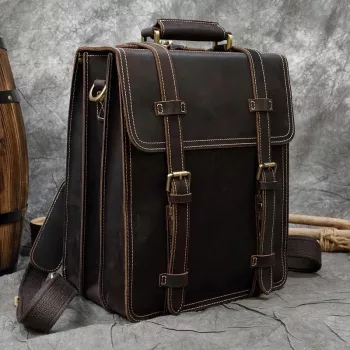
Our Men’s Genuine Leather 14″ Laptop Backpack & Business Tote is a multi-use cowhide bag intended for a 14-inch laptop. If you’re considering it for your commute, start with two questions: Does your laptop fit by its outside dimensions, and would you use both carry styles during a typical week?
Picture a day that begins with a walk between stops. Backpack carry may be the practical choice when you want your hands available for a ticket, phone, or coffee. Once you arrive, tote-style carry may feel simpler for a short move from your desk to a meeting room. Neither mode needs to be your permanent choice; the appeal is being able to adapt the bag to the next part of the day.
That flexibility is useful only if it suits your actual routine. If you spend most of the day walking, consider how the bag feels with your normal load in backpack mode. If you frequently move between nearby rooms or appointments, consider whether tote-style carry would be convenient for those shorter trips. Our team recommends making that decision around your schedule rather than assuming one style is always better.
The same bag can serve different moments, but your route and what you’ve packed should guide the choice.
| Workday moment | Carry style to consider | Why it may help |
|---|---|---|
| Walking between stops | Backpack | Keeps hands available for a phone, ticket, or coffee. |
| Moving into a meeting | Business tote | Offers an easy grab-and-go option for a short distance. |
| A day with both | Switch as needed | Lets one bag serve different parts of the schedule. |
Before counting on either mode for an upcoming trip, review the product page’s current details about how the bag changes between carry styles. If your commute includes airport travel, it also helps to review the TSA’s guidance on laptops at security screening before you pack. Screening instructions are separate from your choice of bag and may affect how readily you need to reach your device.
“14-inch laptop” describes a screen-size class, not a standard set of outside measurements. Two laptops with 14-inch screens can have different widths, depths, and thicknesses. Measure your device or find its complete external dimensions from its manufacturer, then compare those numbers with the bag’s listed interior measurements. Allow enough clearance to place the laptop in and take it out without forcing it.
If you normally use a protective sleeve or bulky case, measure the laptop with that cover on. It is the covered device—not the bare laptop—that needs to fit your everyday setup. If you prefer a sleeve for protection, plan for it as a separate part of your packing routine rather than assuming a particular padded compartment comes with the bag.
Once the measurements look promising, try a realistic packing plan. Account for your laptop, charger, notebook, and the smaller items you take to work. Those extras can change how easily a bag closes, even when the laptop itself fits. Leave room to close it without pressing hard against your device or overfilling the bag. A workable fit on an ordinary Tuesday matters more than a fit that succeeds only when the bag is nearly empty.
Genuine cowhide may appeal to you if you prefer the look and feel of leather in a work bag. Your choice should also reflect how much care you want to give an item you use regularly. Leather’s appearance can vary, so make your decision using the current product details rather than expecting a particular finish, texture, or change in appearance over time.
For routine care, wipe surface dust away with a soft cloth. Address spills promptly, and if the bag becomes damp, let it air-dry away from direct heat. Check any care instructions supplied with the item before applying a cleaner or conditioner. Those instructions are the best starting point for choosing a product that suits the bag’s leather.
Your usual load matters just as much as material. Packing only what you need can make either carry style more comfortable and leave space for the items you pick up during the day. If you like listening on the commute, our High-Fidelity 9.2mm Beryllium-Coated Single Driver In-Ear Headphones are another option to consider for your daily kit—but include any accessories you carry when planning your bag space.
Not necessarily. Screen size does not establish a laptop’s outside dimensions. Compare your device, including any case, with the bag’s listed interior measurements.
Backpack carry can be convenient for longer walks or hands-free travel, while tote-style carry may suit brief moves between a desk and a meeting. Choose based on your route and load.
Use a soft, dry cloth for routine dust, address spills promptly, and let a damp bag air-dry away from heat. Follow the item’s care instructions before applying leather products.
Some workdays involve a walk to transit, hours at a desk, and a meeting across town. Carrying separate bags for each part of that schedule can be more trouble than it’s worth. A bag that works as both a backpack and a business tote gives you two ways to carry the same daily essentials, depending on where you’re headed next.
Our Men’s Genuine Leather 14″ Laptop Backpack & Business Tote is a multi-use cowhide bag intended for a 14-inch laptop. If you’re considering it for your commute, start with two questions: Does your laptop fit by its outside dimensions, and would you use both carry styles during a typical week?
Picture a day that begins with a walk between stops. Backpack carry may be the practical choice when you want your hands available for a ticket, phone, or coffee. Once you arrive, tote-style carry may feel simpler for a short move from your desk to a meeting room. Neither mode needs to be your permanent choice; the appeal is being able to adapt the bag to the next part of the day.
That flexibility is useful only if it suits your actual routine. If you spend most of the day walking, consider how the bag feels with your normal load in backpack mode. If you frequently move between nearby rooms or appointments, consider whether tote-style carry would be convenient for those shorter trips. Our team recommends making that decision around your schedule rather than assuming one style is always better.
The same bag can serve different moments, but your route and what you’ve packed should guide the choice.
| Workday moment | Carry style to consider | Why it may help |
|---|---|---|
| Walking between stops | Backpack | Keeps hands available for a phone, ticket, or coffee. |
| Moving into a meeting | Business tote | Offers an easy grab-and-go option for a short distance. |
| A day with both | Switch as needed | Lets one bag serve different parts of the schedule. |
Before counting on either mode for an upcoming trip, review the product page’s current details about how the bag changes between carry styles. If your commute includes airport travel, it also helps to review the TSA’s guidance on laptops at security screening before you pack. Screening instructions are separate from your choice of bag and may affect how readily you need to reach your device.
“14-inch laptop” describes a screen-size class, not a standard set of outside measurements. Two laptops with 14-inch screens can have different widths, depths, and thicknesses. Measure your device or find its complete external dimensions from its manufacturer, then compare those numbers with the bag’s listed interior measurements. Allow enough clearance to place the laptop in and take it out without forcing it.
If you normally use a protective sleeve or bulky case, measure the laptop with that cover on. It is the covered device—not the bare laptop—that needs to fit your everyday setup. If you prefer a sleeve for protection, plan for it as a separate part of your packing routine rather than assuming a particular padded compartment comes with the bag.
Once the measurements look promising, try a realistic packing plan. Account for your laptop, charger, notebook, and the smaller items you take to work. Those extras can change how easily a bag closes, even when the laptop itself fits. Leave room to close it without pressing hard against your device or overfilling the bag. A workable fit on an ordinary Tuesday matters more than a fit that succeeds only when the bag is nearly empty.
Genuine cowhide may appeal to you if you prefer the look and feel of leather in a work bag. Your choice should also reflect how much care you want to give an item you use regularly. Leather’s appearance can vary, so make your decision using the current product details rather than expecting a particular finish, texture, or change in appearance over time.
For routine care, wipe surface dust away with a soft cloth. Address spills promptly, and if the bag becomes damp, let it air-dry away from direct heat. Check any care instructions supplied with the item before applying a cleaner or conditioner. Those instructions are the best starting point for choosing a product that suits the bag’s leather.
Your usual load matters just as much as material. Packing only what you need can make either carry style more comfortable and leave space for the items you pick up during the day. If you like listening on the commute, our High-Fidelity 9.2mm Beryllium-Coated Single Driver In-Ear Headphones are another option to consider for your daily kit—but include any accessories you carry when planning your bag space.
Not necessarily. Screen size does not establish a laptop’s outside dimensions. Compare your device, including any case, with the bag’s listed interior measurements.
Backpack carry can be convenient for longer walks or hands-free travel, while tote-style carry may suit brief moves between a desk and a meeting. Choose based on your route and load.
Use a soft, dry cloth for routine dust, address spills promptly, and let a damp bag air-dry away from heat. Follow the item’s care instructions before applying leather products.




Leave a comment